YouTube SEO: The Complete Guide to Ranking Videos in 2026
Everything you need to rank your YouTube videos higher in search. Algorithm ranking factors, title optimization, tags, descriptions, thumbnails, Shorts SEO, and free tools.
800M+
daily search queries on YouTube — the world's second-largest search engine
500 hours
Uploaded per minute
70%
Views from recommendations
90%
Top videos have SEO titles
48 hours
Algorithm evaluation window
What Is YouTube SEO and Why It Matters in 2026
YouTube SEO is the practice of optimizing every element of your video — title, description, tags, thumbnail, and engagement signals — so that it ranks higher in YouTube search results.
YouTube processes over 800 million search queries every single day. That makes it the second-largest search engine on the planet, behind only Google.
Here is why YouTube SEO matters more in 2026 than ever before. The platform now has over 2.7 billion monthly active users competing for attention. Organic discovery through search and recommendations is the primary growth engine for channels of every size.
Without SEO, your videos rely entirely on subscribers and external traffic. With SEO, YouTube actively sends new viewers to your content for months or even years after you publish.
The difference between a video that gets 500 views and one that gets 50,000 views often comes down to discoverability. A well-optimized video compounds views over time because YouTube keeps serving it to relevant searchers.
Unlike social media posts that die within 48 hours, SEO-optimized YouTube videos are evergreen assets. They generate passive views indefinitely as long as people keep searching for the topic.
Without YouTube SEO
Views spike on day 1, then flatline. You are stuck on the content treadmill, constantly needing new uploads to maintain traffic.
With YouTube SEO
Views compound over months. Old videos keep driving traffic. Your channel grows even when you take breaks from uploading.
How the YouTube Algorithm Ranks Videos
Understanding how YouTube's algorithm decides which videos to show is the foundation of effective SEO. The algorithm uses four primary ranking signals, each measuring a different aspect of video quality.
Click-Through Rate (CTR)
Weight: Very HighThe percentage of people who click your video after seeing the thumbnail. A 10% CTR means 1 in 10 viewers who see your video in search results actually click on it. YouTube interprets high CTR as a strong signal that your title and thumbnail match what people are looking for.
Watch Time
Weight: Very HighTotal minutes watched across all viewers. A 10-minute video watched by 1,000 people for an average of 7 minutes generates 7,000 minutes of watch time. YouTube prioritizes videos that accumulate large amounts of total watch time because it keeps users on the platform.
Audience Retention
Weight: HighThe percentage of your video that viewers watch on average. A 50% retention on a 10-minute video means the average viewer watches 5 minutes. YouTube uses retention curves to identify which parts of your content are engaging and which cause drop-offs.
Session Time
Weight: HighWhether your video leads viewers to watch more YouTube content afterward. Videos that start longer viewing sessions get a significant ranking boost because YouTube earns more ad revenue when users stay on the platform.
YouTube Ranking Factor Weight
Beyond these four signals, YouTube also considers engagement metrics like likes, comments, shares, and new subscriptions triggered by the video. These act as quality signals that confirm whether viewers genuinely valued the content.
Keyword relevance is the gatekeeper. Your title, description, and tags determine which searches your video is eligible to appear for. But once you pass the relevance threshold, behavioral signals decide your ranking position.
Think of it this way: keywords get you into the race, but CTR and watch time determine whether you win it. A video with perfect keywords but 2% CTR will lose to a video with good keywords and 8% CTR every time.
“Keywords get you into the race, but click-through rate and watch time determine whether you win it. The algorithm rewards videos that people actually want to watch.”
— YouTube Creator Academy
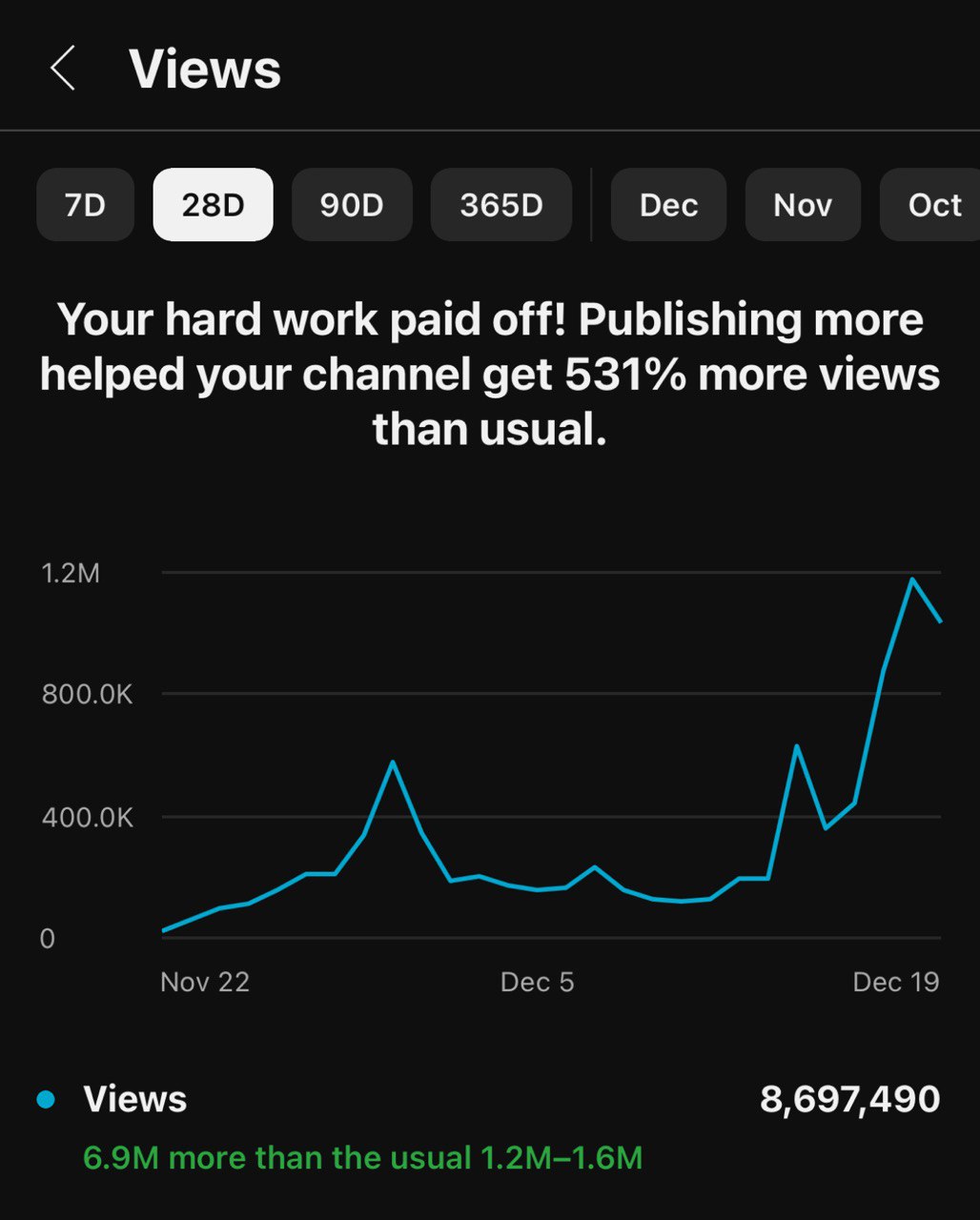
YouTube Title Optimization for SEO
Your title is the single most important text-based ranking signal on YouTube. It determines which searches your video appears for and directly influences whether viewers click. Mastering YouTube title optimization is the highest-leverage SEO skill you can develop.
Title SEO Rules
The first 40 characters of your title carry the most algorithmic weight. YouTube's system pays special attention to the opening words when matching search queries.
A title like "How to Edit Videos in DaVinci Resolve" will outrank "My Workflow for Editing in DaVinci Resolve" because the keyword is front-loaded.
Curiosity gaps are the secret weapon of high-CTR titles. A curiosity gap creates an information gap that viewers can only close by watching your video.
Compare "How I Gained 10K Subscribers" with "The Strategy That Got Me 10K Subscribers (Not What You Think)." The second title creates a knowledge gap that drives clicks.
The optimal title length is 40-60 characters. Titles under 40 characters often miss keyword opportunities. Titles over 60 characters get truncated on mobile, which is where over 70% of YouTube views happen.
Use TitleHook's title generator to create SEO-optimized titles that combine keyword placement with proven psychological triggers. The tool analyzes patterns from viral videos to generate titles built for both search ranking and click-through rate.
Weak SEO Title
"My Gaming Setup Tour 2026"
No keyword specificity, no hook, no search intent match
Strong SEO Title
"Best Gaming Setup Under $1000 (2026 Guide)"
Keyword front-loaded, specific, search intent aligned
YouTube Tag Strategy for Better Rankings
YouTube tags help the algorithm understand what your video is about and categorize it correctly. While tags are less influential than titles and descriptions, they still contribute to discoverability in meaningful ways. Check our complete YouTube tags guide for advanced strategies.
Tags serve three specific functions. First, they help YouTube match your video to search queries, especially misspelled ones. Second, they influence which videos appear in the "suggested videos" sidebar. Third, they help YouTube understand your channel's topical focus over time.
Tag Strategy Framework
Exact target keyword
youtube seo, youtube seo 2026
Long-tail variations
how to do seo for youtube videos, youtube search optimization tips
Related topics
youtube algorithm, video ranking factors
Broad category terms
youtube tips, video marketing
Common misspellings
youtub seo, youtube seo guid
| Tag Practice | Good Strategy | Bad Strategy |
|---|---|---|
| Number of tags | 8-12 relevant tags | 30+ loosely related tags |
| First tag | Exact target keyword | Generic broad term |
| Specificity | Mix of long-tail + broad | All broad, generic tags |
| Relevance | All tags match video content | Trending but unrelated tags |
| Misspellings | Include 1-2 common typos | No misspelling coverage |
| Competitor tags | Research and adapt | Copy-paste entire tag set |
| Updates | Refresh quarterly | Set once and forget |
The most important rule for tags is relevance over quantity. Using 10 highly relevant tags outperforms using 30 loosely related ones. YouTube may actually penalize tag stuffing by reducing your video's ranking potential.
Start with long-tail tags and work toward broader terms. Your first tag should be your exact target keyword phrase. The last few tags can be broader category terms. This hierarchy tells YouTube exactly what your video covers while connecting it to wider topic clusters.
Use the TitleHook tag generator to instantly create optimized tag sets based on your video topic. It generates tags in the correct priority order with the right mix of specific and broad terms.
YouTube Description Best Practices for SEO
The video description is the second most important text-based ranking signal after the title. YouTube uses your description to understand content context and match it to relevant search queries. Use the TitleHook generator to create optimized descriptions quickly.
The first 150 characters of your description are critical. This is the text that appears below your title in search results before viewers click "Show more." You need your primary keyword and a compelling reason to watch within those first two sentences.
Optimal Description Structure
Lines 1-2 (Above the fold)
Primary keyword + value proposition. This text shows in search results. Make it compelling and keyword-rich without being spammy.
Lines 3-5 (Video summary)
Expand on what the video covers. Include 2-3 secondary keywords naturally. Give viewers a reason to keep reading.
Timestamps
Add chapter timestamps (0:00 format). YouTube converts these into clickable chapters and may show them as key moments in search results, boosting CTR.
Links & Resources
Link to tools, resources, and related content mentioned in the video. Internal links to your other videos boost session time.
Call-to-Action
Subscribe reminder, social links, and relevant hashtags. Place this at the bottom since most viewers never scroll this far.
Write at least 200 words in your description. Short descriptions with just a couple of sentences leave ranking potential on the table. YouTube has more text to analyze when your description is thorough, which helps it match your video to a wider range of search queries.
Timestamps are an underrated SEO tool. When you add timestamps in the 0:00 format, YouTube creates clickable chapters. These chapters can appear as "key moments" in Google search results, giving your video additional real estate on the search page.
Avoid keyword dumping at the bottom of your description. YouTube's algorithm can detect when creators stuff unnatural keyword lists into descriptions and may reduce your ranking as a result.
The 6-Step YouTube SEO Checklist
Follow this checklist for every video you publish. Consistency is what separates channels that grow from those that plateau.
Research Your Target Keyword
Use YouTube Autocomplete and Google Trends (YouTube filter) to find a keyword with solid search volume and manageable competition. Validate by checking if top results have under 50K views.
Craft an SEO-Optimized Title
Front-load your primary keyword in the first 40 characters. Keep it between 40-60 characters total. Add a curiosity gap or emotional hook to drive clicks.
Write a Keyword-Rich Description
Include your primary keyword in the first 2 sentences. Write at least 200 words. Add timestamps, related links, and a call-to-action. Make it useful for humans first.
Add 8-12 Targeted Tags
Start with your exact target keyword, then add long-tail variations, related topics, and 1-2 common misspellings. Use TitleHook to generate tags in priority order.
Design a High-CTR Thumbnail
Use high-contrast colors, limit text to 3-4 words, show faces with emotion, and make sure your thumbnail stands out from competing search results.
Monitor and Optimize After Publishing
Check CTR and retention 48 hours after publishing. If CTR is below 4%, update your title and thumbnail. Review search terms quarterly to find new keyword opportunities.
Generate SEO-Optimized Titles in Seconds
TitleHook analyzes patterns from viral YouTube videos to generate titles built for both search ranking and click-through rate. Free to start.
Try TitleHook FreeOptimize Your Titles, Tags & Descriptions
TitleHook generates SEO-optimized titles, tags, and descriptions using patterns from viral YouTube videos. Built specifically for YouTube search ranking.
Try TitleHook FreeFree to start. See pricing for unlimited access.
Thumbnail Optimization for Higher CTR
Thumbnails are the visual counterpart to your title. Together, they form the "packaging" that determines whether viewers click. A perfectly SEO-optimized title paired with a bad thumbnail will still underperform. Learn more about this relationship in our CTR optimization guide.
Custom thumbnails receive approximately 30% more impressions than auto-generated ones. This is because YouTube's system recognizes that creators who invest in custom thumbnails typically produce higher-quality content.
Use high contrast colors
Bright colors stand out against YouTube's white background. Yellow, red, and blue thumbnails consistently outperform muted tones.
Limit text to 3-4 words
Thumbnails appear small on mobile. Long text becomes unreadable. Use your title for details and your thumbnail for visual impact.
Show faces with emotion
Human faces with clear emotional expressions (surprise, excitement, shock) trigger an instinctive response that drives clicks.
Create visual contrast with competitors
Search your target keyword on YouTube. Look at the top 10 thumbnails. Then design yours to stand out from that specific set.
The thumbnail-title relationship should be complementary, not redundant. Your thumbnail should show what happens, while your title explains why it matters.
If your title says "I Spent 100 Days Building a City," your thumbnail should show the impressive result, not repeat the text.
Test different thumbnail styles and track CTR changes in YouTube Studio. Even a 1% CTR improvement can translate to thousands of additional views because YouTube serves your video to more people when CTR increases.
YouTube Keyword Research Methods
Keyword research is the foundation of YouTube SEO. Without it, you are guessing which topics people search for and how to phrase your titles. Proper research reveals exactly what your target audience types into the search bar.
See our dedicated title tips guide for more keyword placement strategies.
4 Free Keyword Research Methods
YouTube Autocomplete
Type your topic into YouTube search and note what suggestions appear. These are real, high-volume queries that people actively search. Add letters after your topic to uncover long-tail variations. For example, type "youtube seo a" then "youtube seo b" and so on.
Competitor Analysis
Find successful videos in your niche with over 100K views. Right-click the page, view source, and search for "keywords" to see their tags. Note which keywords appear in their titles, descriptions, and tags. This reveals proven keyword opportunities in your niche.
Google Trends (YouTube Filter)
Go to Google Trends, search your topic, then filter by "YouTube Search" instead of "Web Search." This shows you trending topics and seasonal patterns specific to YouTube. Compare multiple keywords to find the highest-demand option.
Comment Mining
Read the comments on popular videos in your niche. Viewers frequently ask questions using exact search phrases. These questions reveal untapped keyword opportunities that even your competitors have missed.
Focus on long-tail keywords when starting out. "YouTube SEO" has massive competition, but "how to do SEO for YouTube Shorts" has far less. Long-tail keywords have lower search volume but much higher ranking probability for newer channels.
Search volume matters, but competition matters more. A keyword with 500 monthly searches and low competition will drive more views to your channel than a keyword with 50,000 monthly searches dominated by established creators.
Validate your keywords before committing. Search each keyword on YouTube and check whether the top results have fewer than 50K views. If they do, you have a realistic chance of ranking. If every result has millions of views, consider a more specific keyword variation.
“The best keyword is not the one with the most searches. It is the one where you can realistically rank on page one. A top-3 position for a 500-search keyword beats page 5 for a 50,000-search keyword every single time.”
— YouTube SEO Research, 2026
YouTube Shorts SEO: How to Rank Short-Form Content
YouTube Shorts now account for over 70 billion daily views globally. While the Shorts algorithm differs from long-form discovery, SEO principles still apply. Optimizing your Shorts metadata can significantly increase reach beyond the Shorts feed.
Shorts titles should be concise, ideally under 40 characters. The display area for Shorts titles is much smaller than for long-form videos. Every character counts, so get your keyword in early and keep it punchy.
Shorts SEO Checklist
Hashtags play a larger role in Shorts SEO than in long-form content. Use relevant and trending hashtags for your Shorts to boost discoverability. The ideal number is 3-5 hashtags per Short.
Retention rate is the dominant ranking factor for Shorts. A Short that 80% of viewers watch to completion will massively outperform one that only 30% finish. This makes your opening hook and pacing more important than keyword optimization.
Repurposing long-form content into Shorts is a proven growth strategy. Take the most engaging 30-60 second segment from a long video and publish it as a Short. This drives traffic to both formats and builds topical authority that improves your SEO across the channel.
YouTube Analytics for SEO: Key Metrics to Track
YouTube Studio Analytics provides the data you need to measure and improve your SEO performance. Knowing which metrics matter — and what benchmarks to aim for — separates data-driven creators from those who guess.
| Metric | Poor | Average | Excellent |
|---|---|---|---|
| Click-Through Rate | Under 2% | 4-6% | 8%+ |
| Average View Duration | Under 30% | 40-50% | 60%+ |
| Audience Retention | Under 35% | 40-55% | 55%+ |
| Search Traffic Share | Under 10% | 15-25% | 30%+ |
| Impressions Growth | Declining | Stable | Growing 10%+ MoM |
Traffic sources tell you where your SEO efforts are paying off. Check the "Traffic source" report in YouTube Studio. If "YouTube Search" is growing as a percentage of total traffic, your keyword optimization is working.
The "Search terms" report shows exactly which queries drive viewers to your videos. Use this data to discover keywords you rank for that you did not intentionally target. These accidental rankings reveal opportunities to create dedicated videos for those topics.
Monitor your CTR over time, not as a snapshot. A single video's CTR naturally decreases as YouTube shows it to broader audiences beyond your subscribers. What matters is whether your channel-wide CTR trends upward as you improve your titles and thumbnails.
Free YouTube SEO Tools You Should Use
You do not need expensive paid tools to do effective YouTube SEO. The best YouTube SEO tool stack combines free purpose-built tools that each handle a specific part of the optimization process.
TitleHook
Try freeAI-powered title generation, tag generation, and description optimization
Purpose-built for YouTube. Generates SEO-optimized titles using patterns from viral videos, creates tag sets in priority order, and writes keyword-rich descriptions. Free tier includes 25 titles and unlimited tags daily.
YouTube Studio Analytics
CTR benchmarks, retention metrics, search terms, traffic sources
The most authoritative data source because it comes directly from YouTube. No third-party tool can match the accuracy of first-party analytics for your own channel.
Google Trends (YouTube filter)
Keyword volume trends, seasonal patterns, regional interest
The only free tool that shows relative search volume specifically for YouTube searches. Essential for comparing keyword options and identifying trending topics before they peak.
YouTube Autocomplete
Discover real search queries viewers type
The most reliable keyword research method. YouTube only suggests queries that have significant search volume. Combine with alphabet soup method for comprehensive keyword lists.
Chrome DevTools (View Source)
Analyze competitor tags and metadata
Right-click any YouTube video page, view source, and search for the keywords meta tag to see exactly which tags competitors use. Free competitive intelligence.
The best workflow combines these tools in sequence. Start with Google Trends and YouTube Autocomplete for keyword research. Use TitleHook to generate optimized titles, tags, and descriptions.
Analyze competitor tags with Chrome DevTools for additional keyword ideas. Then monitor performance in YouTube Studio Analytics to refine your approach over time.
TitleHook Title Generator
AI-powered titles optimized for CTR and search ranking. Generates 5 options per query using viral video patterns.
TitleHook Tag Generator
Creates prioritized tag sets with the right mix of exact match, long-tail, and broad category terms.
TitleHook Description Generator
Writes keyword-rich descriptions with proper structure, timestamps, and call-to-action sections.
Google Trends (YouTube Filter)
Free tool showing relative search volume trends, seasonal patterns, and regional interest for YouTube searches.
YouTube Studio Analytics
First-party data on CTR, retention, search terms, and traffic sources. The most accurate performance data available.
Common YouTube SEO Mistakes to Avoid
Even experienced creators make SEO mistakes that limit their video's reach. These are the most common errors we see across thousands of channels, along with the specific fix for each one.
Keyword stuffing the title
Use your primary keyword once, naturally. YouTube can detect forced repetition and it reduces CTR because titles read unnaturally to viewers.
Ignoring the first 150 characters of the description
Write your most compelling, keyword-rich sentences first. This is the only description text visible in search results before clicking "Show more."
Using irrelevant or too many tags
Stick to 8-12 highly relevant tags. Irrelevant tags can confuse the algorithm about your video topic and dilute ranking power across too many keywords.
No custom thumbnail
Always create a custom thumbnail. Auto-generated thumbnails are random frames that rarely represent your content well, resulting in low CTR.
Copying competitor titles exactly
Use competitor titles for keyword inspiration, not as templates. Identical titles split search traffic. Differentiate with a unique angle or added value proposition.
Optimizing for high-competition keywords only
Target a mix of difficulty levels. Use long-tail keywords to build authority before competing for broad, high-volume terms.
Publishing without timestamps
Add chapter timestamps to every video over 5 minutes. Timestamps create key moments in Google search results and improve viewer experience metrics.
Ignoring analytics after publishing
Check CTR, retention, and traffic sources 48 hours after publishing. Update titles and thumbnails on underperforming videos instead of moving on.
Writing descriptions for the algorithm instead of humans
Write naturally. YouTube is sophisticated enough to understand context. A well-written description that humans enjoy reading will also rank well.
Never updating old video metadata
Review your top 20 videos quarterly. Update titles with current year keywords, refresh descriptions, and add new tags for emerging search terms.
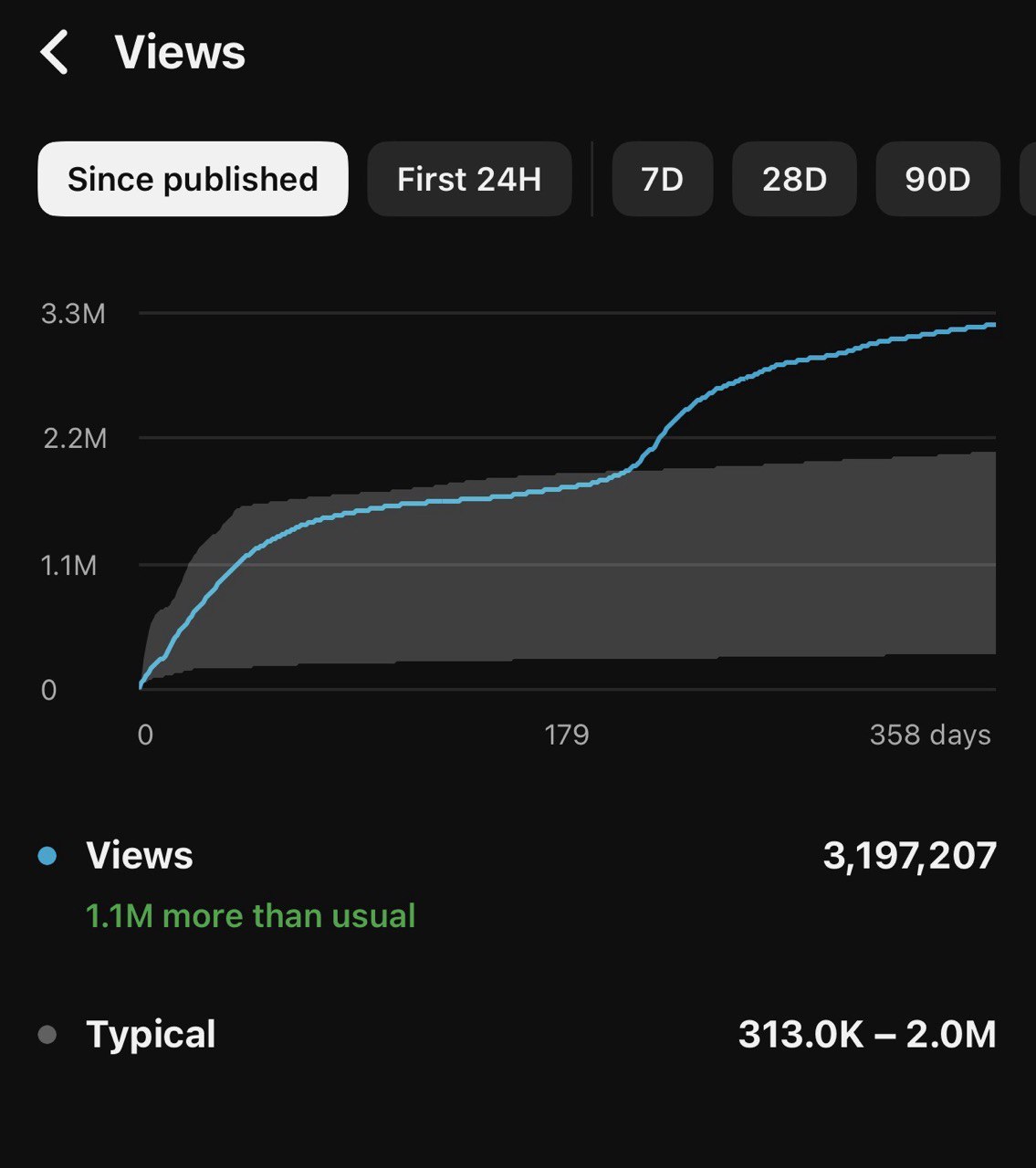
Stop Guessing. Start Ranking.
Every tool and strategy in this guide is built into TitleHook. Generate SEO-optimized titles, tags, and descriptions in seconds instead of hours.
Generate SEO Titles FreeStart Ranking Your YouTube Videos Today
TitleHook generates SEO-optimized titles, tags, and descriptions built on patterns from viral YouTube videos. The fastest way to apply everything in this guide.
Generate SEO Titles FreeRelated Articles
Ready to Create Viral Titles?
TitleHook uses proven frameworks from top-performing viral videos to generate click-worthy titles in seconds.
Try TitleHook FreeNo credit card required • Free to start
Related Articles
YouTube SEO: Complete Guide to Ranking Videos
Master YouTube SEO with titles, descriptions, tags, and signals.
YouTube Keyword Research — Complete Guide
How to find keywords that actually drive views on YouTube.
Best YouTube Title Generator — Data-Driven Viral Titles
Data-driven title generation using proven viral patterns.
Best YouTube Title Generator 2026 — Top 10 Ranked
We tested 10 tools across 5 niches. Here are the results.